
hipaa compliant email for a small practice: what to automate
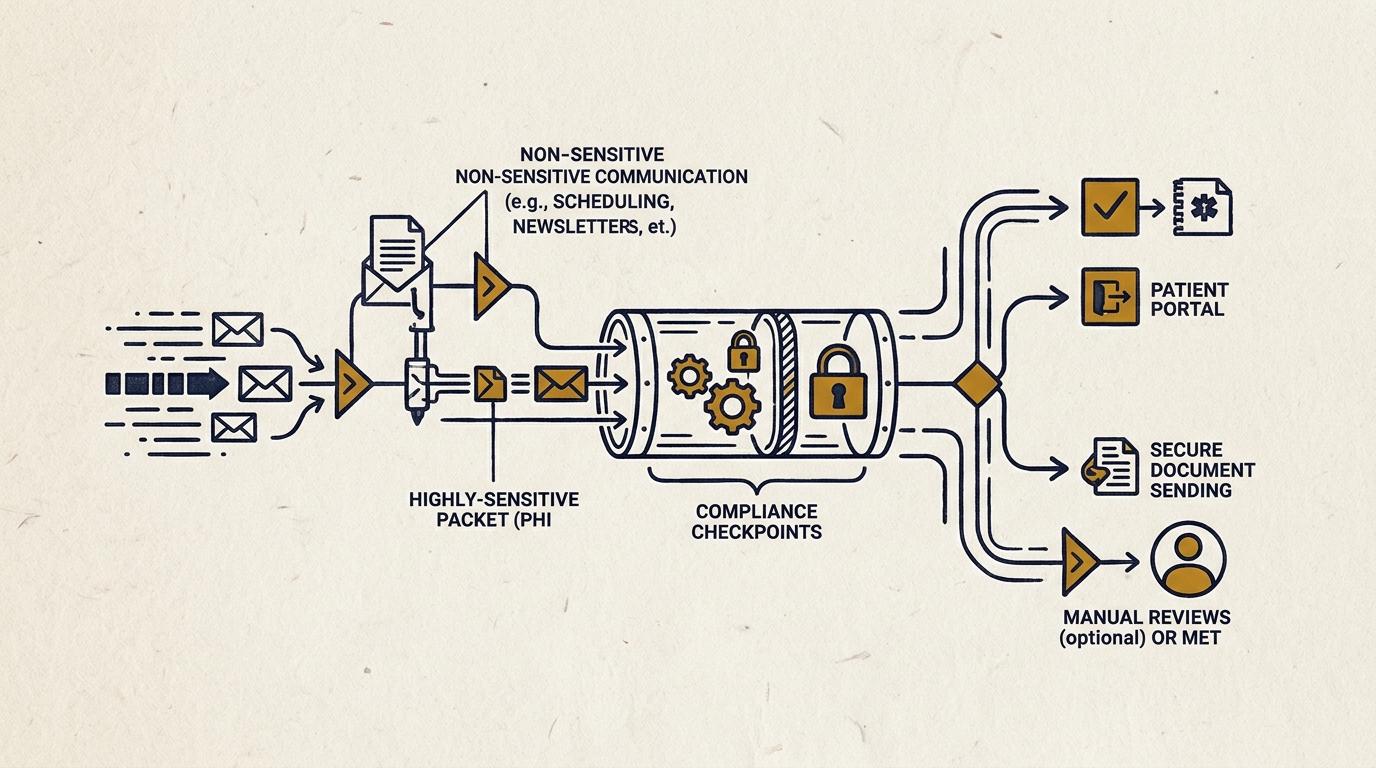
by the end of this guide you will have an inbox pipeline that never lets phi sit in an unauthenticated thread. not because you bought a pricier portal, but because inbound patient data and outbound office mail stop sharing a lane. extraction happens in one place. transmission happens in another. nothing moves between them without a rule that you can point to and a log that proves it ran.
the high-level shape is simple: patients submit through a form built for this, not a mailto link. a job reads that submission, strips what needs stripping, and routes it. a human sees anything the rule can't resolve on its own. standard email keeps doing what it's good at, which is everything that isn't clinical.
the compliance boundary: why standard inboxes fail the audit
consumer email was never built to hold a patient's condition, their account number, or a photo of an injury. tls encrypts a message in transit, but it does nothing once that message lands in an inbox that syncs to someone's phone, gets forwarded to a personal gmail, or sits in a thread with no access log. a business associate agreement with your provider is necessary. it is also not the control. the baa says your vendor will handle phi responsibly if it ends up in their system. it does not stop your front desk from pasting a patient's intake answers into a reply, or stop a staff member's phone from caching a message after they leave.
the fix is not a better inbox. it's a boundary: phi enters through a channel designed to capture it correctly, and standard email is kept on the other side of that line, carrying only what doesn't need protecting.
prerequisites: infrastructure before implementation
before any of the steps below make sense, four things need to already be true.
- a mail platform, google workspace or microsoft 365, with a signed baa, not just purchased, signed and on file.
- control of your own domain's dns, because authentication and routing rules live there.
- a form platform built for hipaa compliant forms, meaning it encrypts at rest, logs submissions, and will also sign a baa. a typeform account won't do this.
- somewhere to run a scheduled job, which can be as modest as a single cloud function, as long as it lives in your own account, not a vendor's shared one.
if any of these four is missing, stop and get it first. automation on top of a gap just moves the gap faster.
step 1: lock down your core mail provider and execute the baa
go to your provider's compliance or trust page and request the baa directly. google and microsoft both offer one at the business tiers, but it is not active until someone at your practice signs it. check the date on it.
once it's signed: turn off consumer sync, the setting that lets a personal gmail or outlook app pull mail via imap. require two-factor on every account. turn on the admin audit log and confirm it's actually retaining entries, not just available as a toggle. this step produces no visible change for staff. that's correct. it's a floor, not a feature.
step 2: route clinical intake through hipaa compliant forms, never raw email
replace every "email us" link on your intake path with a structured form. the form should capture a timestamp, a consent checkbox tied to that timestamp, and only the fields you actually need, not a free-text box inviting someone to describe their symptoms in paragraph form.
a mailto link has no record of who saw it, what they typed, or when. a form submission does. that record is what makes an audit answerable instead of a guess.
step 3: use automated parsing to extract, never to decide
once submissions land somewhere structured, a scheduled job can read them. this is the part worth automating, and the part worth being strict about.
the job's role is to extract and sort: is this a refill request, a scheduling question, or something that reads as urgent. it tags the submission accordingly. it does not decide what happens to a clinical question. that decision, what counts as urgent, what requires a callback inside an hour, is a fixed rule written by someone at the practice, not a judgment the model makes on the fly. the job stages its output and a staff member confirms the routing before anything moves further. every sort, every confirmation, gets logged.
[[FIGURE:1]]
the same pattern that keeps an ad account from silently leaking budget on the wrong clicks applies here: a weekly or daily automated pass, a staged proposal, a human gate before anything commits. automation does the reading. a person, or a fixed rule, makes the call.
step 4: configure deterministic fallback when automation fails
decide now what happens when the parsing job doesn't run, the api is down, or a submission fails validation. the answer should never be "it waits until someone notices." the answer should be: it routes straight to a human triage queue, inside your own environment, immediately.
if the system can't classify something with confidence, that's also a fallback case, not a guess. an automated pipeline that occasionally fails loud and routes to a person is safer than one that fails quiet and drops a message.
step 5: audit every outbound message against minimum necessary rules
outbound is where practices get loose, because it feels less sensitive than intake. it isn't. an appointment reminder that includes a diagnosis or a provider's specialty in the subject line is phi in transit over standard mail.
the discipline here is narrow: outbound notifications should say "you have a secure message" or "your appointment is confirmed," not what the appointment is for. anything with clinical content goes through the secure channel, with email only ever pointing at it.
common pitfalls that trigger regulatory audits
three mistakes show up again and again in practices that thought they were covered.
first, treating tls as sufficient. tls protects the trip between servers. it says nothing about what happens to the message after it arrives in someone's inbox.
second, staff replying to a patient from their personal inbox because the secure portal's notification email was "easier" to answer directly. that single reply can put phi into an unauthenticated thread that the rest of your system was built to avoid.
third, burying identifying details in subject lines. a subject line is often the one part of an email that isn't encrypted even when the body is, because many systems preview subject lines in notifications.
the handover: keeping the pipeline in your own accounts
every piece of this, the mail platform, the forms tool, the job that parses submissions, should live in accounts your practice owns, not a vendor's shared infrastructure. that is what makes the thing auditable and what makes it leaveable. if you ever need to switch who built or maintains this, it should be a handover of credentials, not a renegotiation for your own data back.
if you want someone to look at your current intake and routing setup and tell you, specifically, where the boundary is weak, the Workflow Audit is a two-week, fixed-scope review built for exactly this, and it's credited toward a build if you move forward.